
Selective Following, Unfollowing and the Follow Queue on Instagram
Following the followers of a competitor or a page in your niche is one of the oldest and still one of the most effective ways to reach your target audience. But when you follow a list blindly, you also spend actions on bot accounts, private profiles and people who will never follow back. With InstaFly v15.2 we added three new tools that put this job completely under your control: Follow by Selecting from a Profile, Unfollow by Selecting from My Following and the Follow Queue.
See a profile's followers, followings, the people who liked a post and similar accounts, and pick people one by one.
Find everyone who doesn't follow you back in one click and unfollow them while your whitelist stays protected.
Follow the people you picked over several days with daily limits, working hours and breaks.
Selective Follow on Instagram: Follow by Selecting from a Profile
In this tool you type a username and press Get. The profile's followers and followings are listed just like in the Instagram app, and the list keeps loading as you scroll.
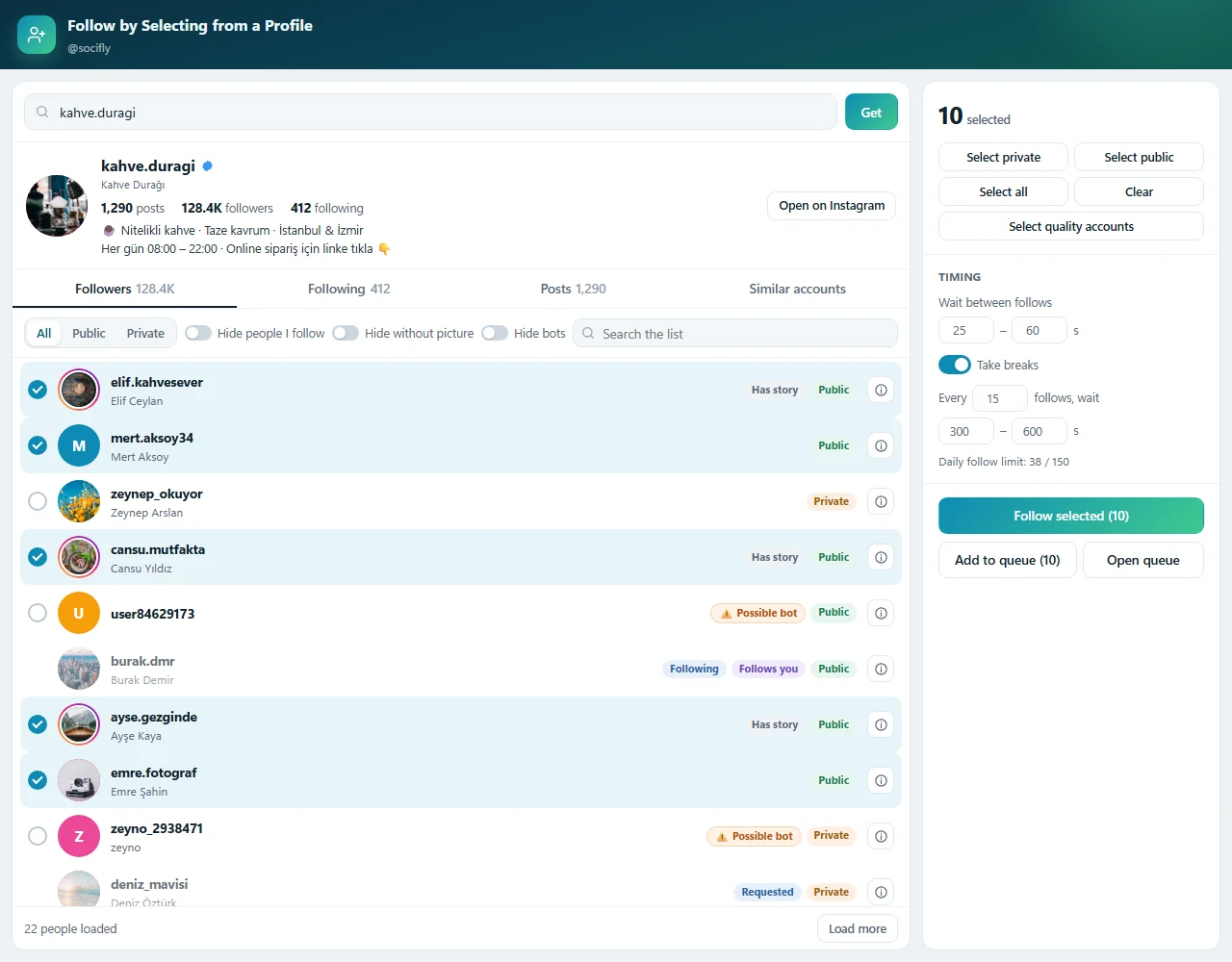
Useful details are shown next to each person:
- Whether the account is Private or Public,
- Whether they have an active story,
- Whether you already follow them, whether they follow you, and whether a follow request was sent,
- Whether they are on your blacklist or whitelist.
Pick people one by one by clicking, or select in bulk with the Select private, Select public and Select all buttons. The switches above the list let you hide people you already follow, accounts without a profile picture and possible bots.
When you're done, just press Follow selected. People are followed one after another with the delays you set, and you can change the delay and break settings while following is in progress.
Follow the People Who Liked or Commented on a Post
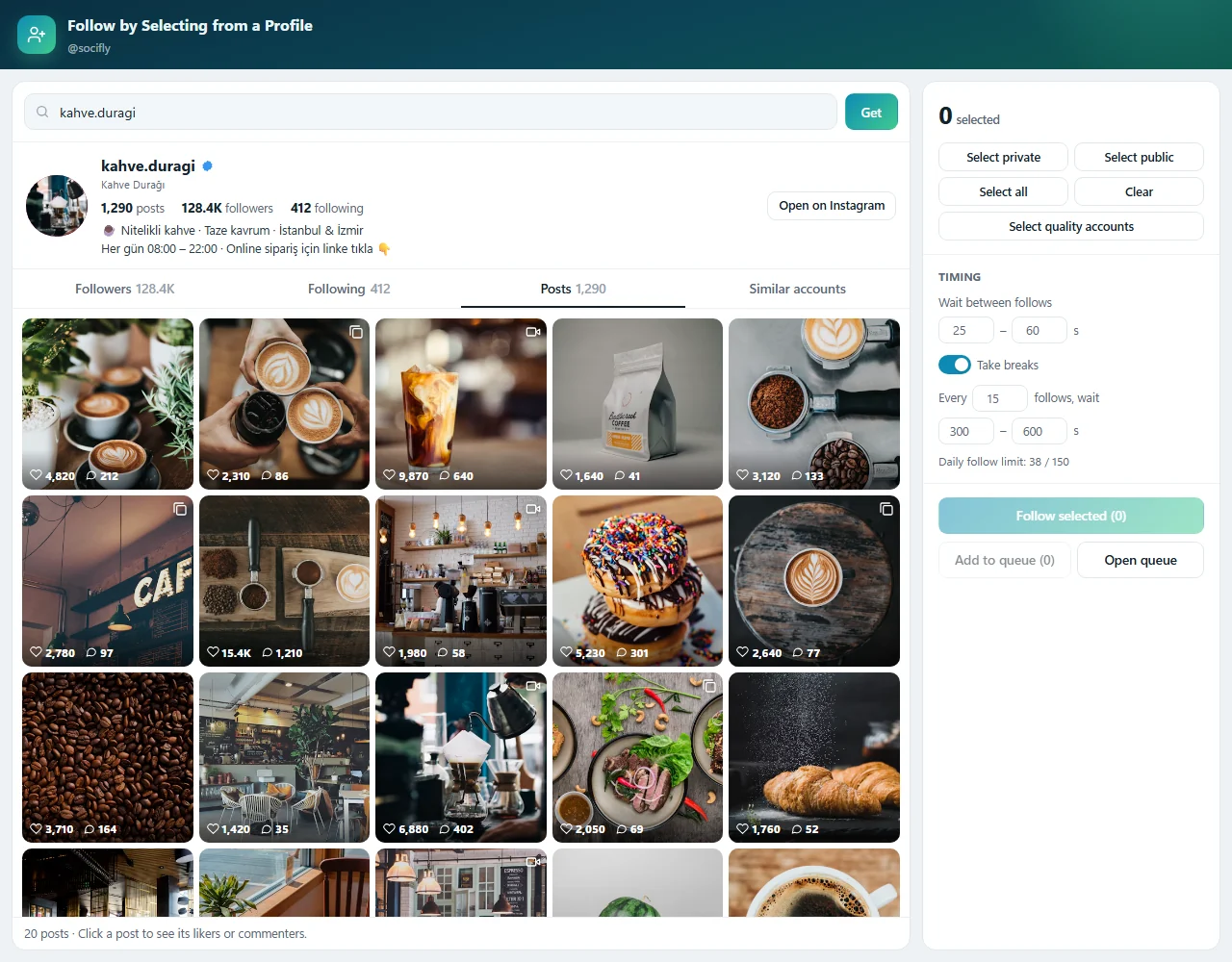
The Posts tab opens the profile's post grid. Click a post to list the people who liked it and who commented on it. Comments are shown next to the commenters, so you can easily spot the people who are really interested. When you go back, the grid stays where you left it.
Grow Your Target Audience With Similar Accounts
The Similar accounts tab shows the accounts Instagram suggests for that profile. You can add the similar accounts of the ones you select to the same list, and jump to any account in the list to continue with its followers without searching for it.
Detecting Bot and Fake Accounts on Instagram
Every bot account you follow is an action wasted from your daily limit. The selective tools give each account in the list a score without sending any extra request. The score looks at:
- No profile picture,
- An empty full name,
- Long strings of digits in the username (like user84629173),
- An account that is both private and without a picture.
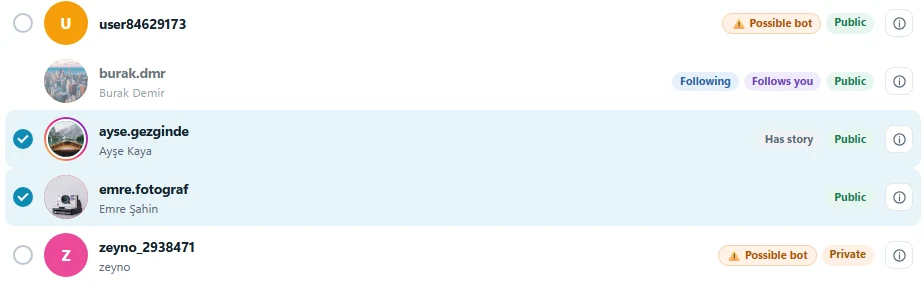
Accounts with an active story and verified accounts score lower. Accounts above the threshold get a Possible bot label, and hovering over it shows why. Remove them from the list with Hide bots, or use Select quality accounts to pick only accounts that have a profile picture and are not bots, in one click.
Unfollow by Selecting from My Following: Find Who Doesn't Follow You Back
You don't need another app to find the accounts you follow that don't follow you back. This tool lists the people you follow and shows each person's status: Doesn't follow you, Follows you, Close friends, Whitelist.
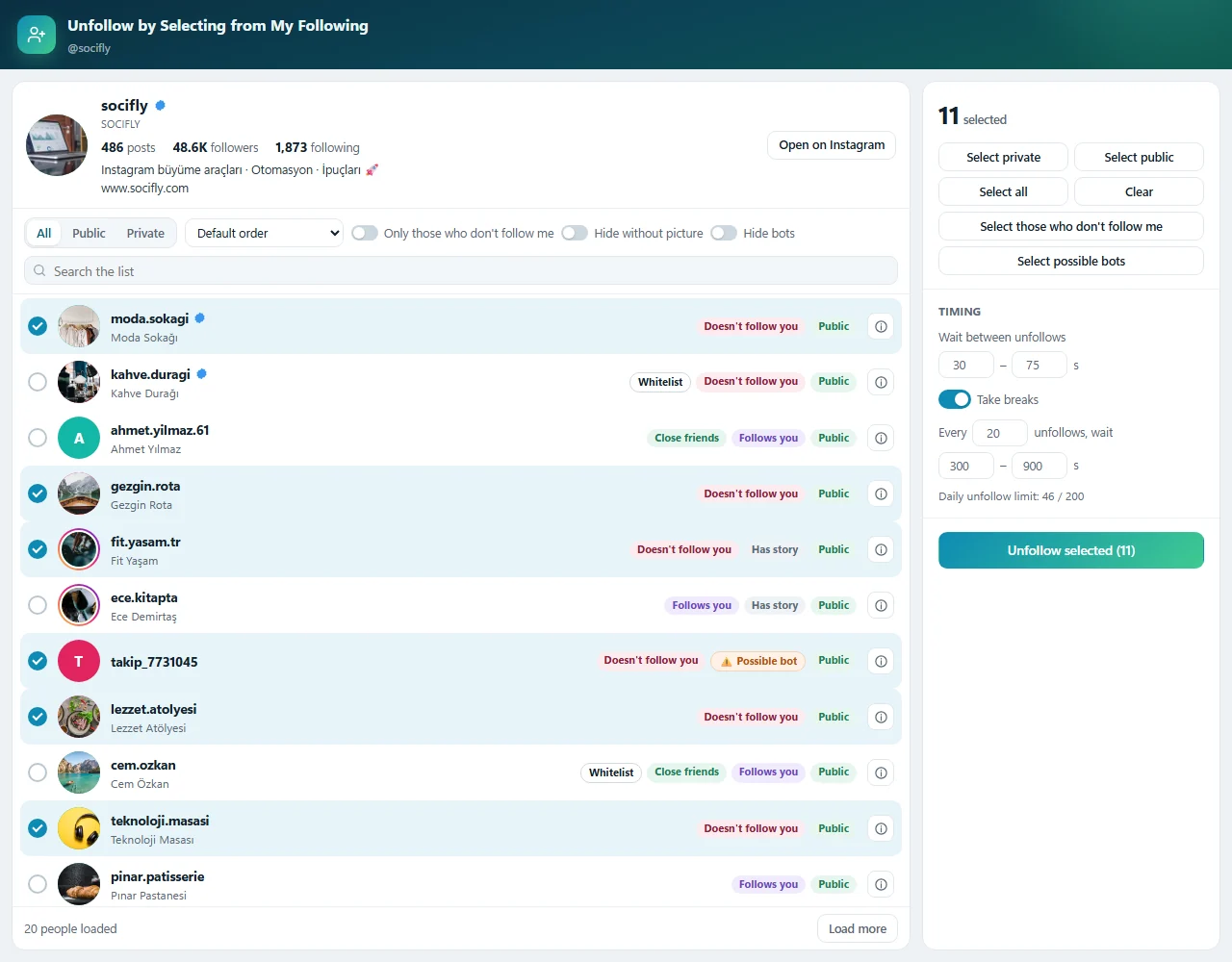
- Sort the list in the default order, by most recently followed or by first followed.
- Filter the list with the Only those who don't follow me switch, and select them all with Select those who don't follow me in one click.
- Clean up bot accounts you followed in the past with Select possible bots.
Whitelisted accounts are skipped automatically in bulk selections. If you still want to unfollow a whitelisted account, you have to select it individually and confirm, so you never unfollow important accounts by mistake.
Selected people are unfollowed one after another with your delay settings when you press Unfollow selected.
Instagram Follow Queue: Spread Your Follows Over Days
You picked hundreds of people, but following all of them today would be risky for your account. This is where the Follow Queue comes in. Add the people you picked to the queue and the tool follows them over the following days by the plan you set.
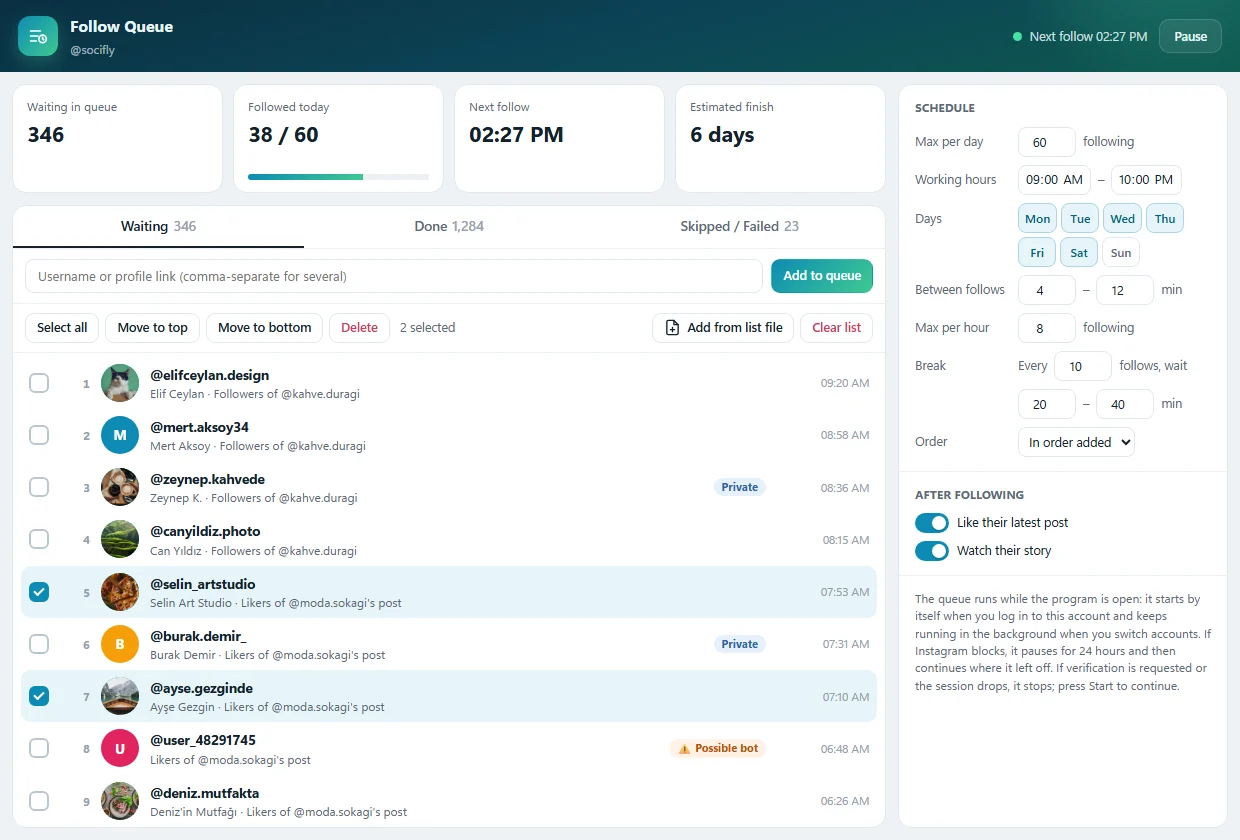
Adding to the queue: Add people with the Add to queue button in the selective follow tool, from a list file with Add from list file, or by typing a username or profile link. You can type several people separated by commas.
Schedule: You decide how the queue works:
- The maximum number of follows per day and per hour,
- The working hours and the days of the week,
- The (random) waiting range between two follows,
- How often to take a break and for how long,
- The order the queue follows.
After following: Optionally, the person's latest post is liked or their story is watched, so the follow looks more natural, like something a real user would do.
Summary cards: The number of people waiting in the queue, how many were followed today, the time of the next follow and the estimated finish are shown at the top of the window. If your plan isn't enough for the daily goal, the tool warns you.
Works in the Background While You Do Other Things
- When you log in to an account, that account's queue starts on its own.
- When you switch to another account, the previous account's queue keeps running in the background. Every account has its own queue.
- Even if you close the window, the queue's status is shown live in the Open Tools bar of the main window.
Keeps Your Account Safe
- The first follow of the day starts after a random delay, so it doesn't start at the same time every day.
- A temporary error doesn't use up the person in the queue. If errors keep coming, the queue stops.
- If Instagram blocks an action, the queue waits 24 hours and then continues where it left off.
- If verification is requested or the session drops, the queue stops and waits for you to press Start.
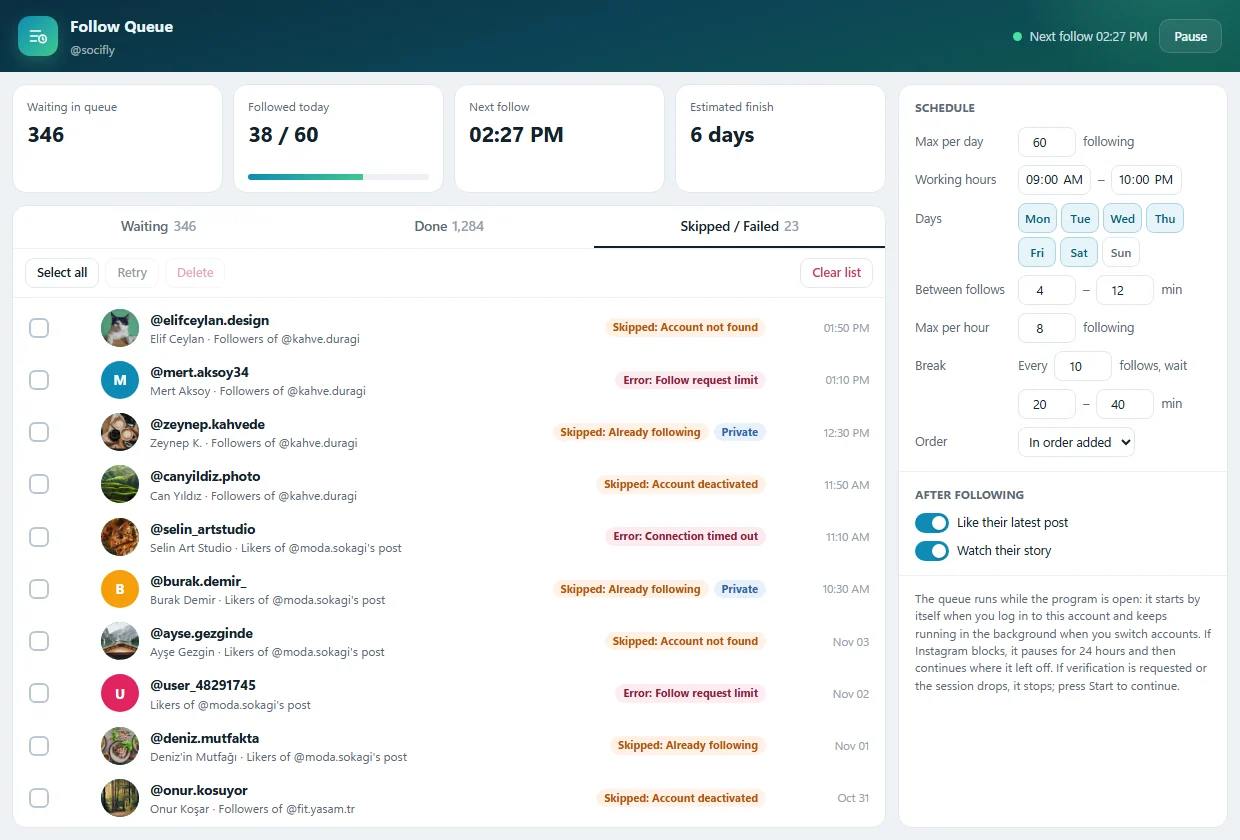
- Skipped and failed people are listed with the reason in the Skipped / Failed tab.
How to Use Them
- On the InstaFly main panel, go to the Follower Tools menu.
- Click Follow by Selecting from a Profile.
- Type the username and press Get.
- List people from the Followers, Following, Posts or Similar accounts tab.
- Select people and set the delay and break times.
- Follow right away with Follow selected, or send them to the Follow Queue with Add to queue.
- In the Follower Tools menu, click Unfollow by Selecting from My Following.
- The people you follow are listed. Mark people with Select those who don't follow me or by your own choice.
- Press Unfollow selected.
- In the Follower Tools menu, click Follow Queue.
- Add people and set the Schedule on the right.
- Start the queue. From then on, it runs on its own every time you log in to your account.
Why InstaFly?
- You decide who to follow instead of following a list blindly.
- The bot score makes sure you spend your actions on real accounts.
- Find who doesn't follow you back in one click while your whitelist stays protected.
- The Follow Queue spreads your follows over days and keeps your account safe.
- Daily limits, breaks and block protection work automatically in every tool.
At InstaFly, our goal is to save you time while you gain followers, without putting your account at risk. Try the new selective follow tools and the Follow Queue, and share your results with us. If there's a feature you'd like us to improve, be sure to tell us in the comments. InstaFly grows thanks to you. ❤️