
- InstaFly
- XFly
- IG Automation
- Sociclon
- InstaKlon
-
WApifly
 WApifly
WhatsApp API on your own number, a CRM-based inbox, team management and AI replies
Visit site
Details
- All products
Instagram Giveaway Tool: Pick Fair Winners from Comments and Likers
Run rule-based, verifiable giveaways from an Instagram post's comments and likers with the InstaFly Giveaway Tool. Result image and CSV included.
Running a giveaway on Instagram is easy; running a fair one is hard. Reading hundreds of comments by hand, counting tags, weeding out several comments from the same person and checking whether the winner really follows you takes hours. On top of that, you need to prove to your followers that the winner was "really picked at random". The Giveaway Tool that comes with InstaFly v15.3 runs your Instagram giveaway together with its rules: it collects the comments, applies the rules, picks the winner at random and keeps the result as a verifiable record.
What Can You Do with the Giveaway Tool?
Run a giveaway from the comments on your own post or on a post from another public account.
Choose entrants from people who commented, people who liked the post, or people who did both.
Set rules such as the number of tags, a word the comment must contain, an entry deadline and a follow requirement.
Choose how many winners and backups there will be.
Save the giveaway result as an image (PNG) and export the entrant list as CSV.
Send a DM to the winners or reply to their comments.
How to Run a Giveaway from an Instagram Post's Comments
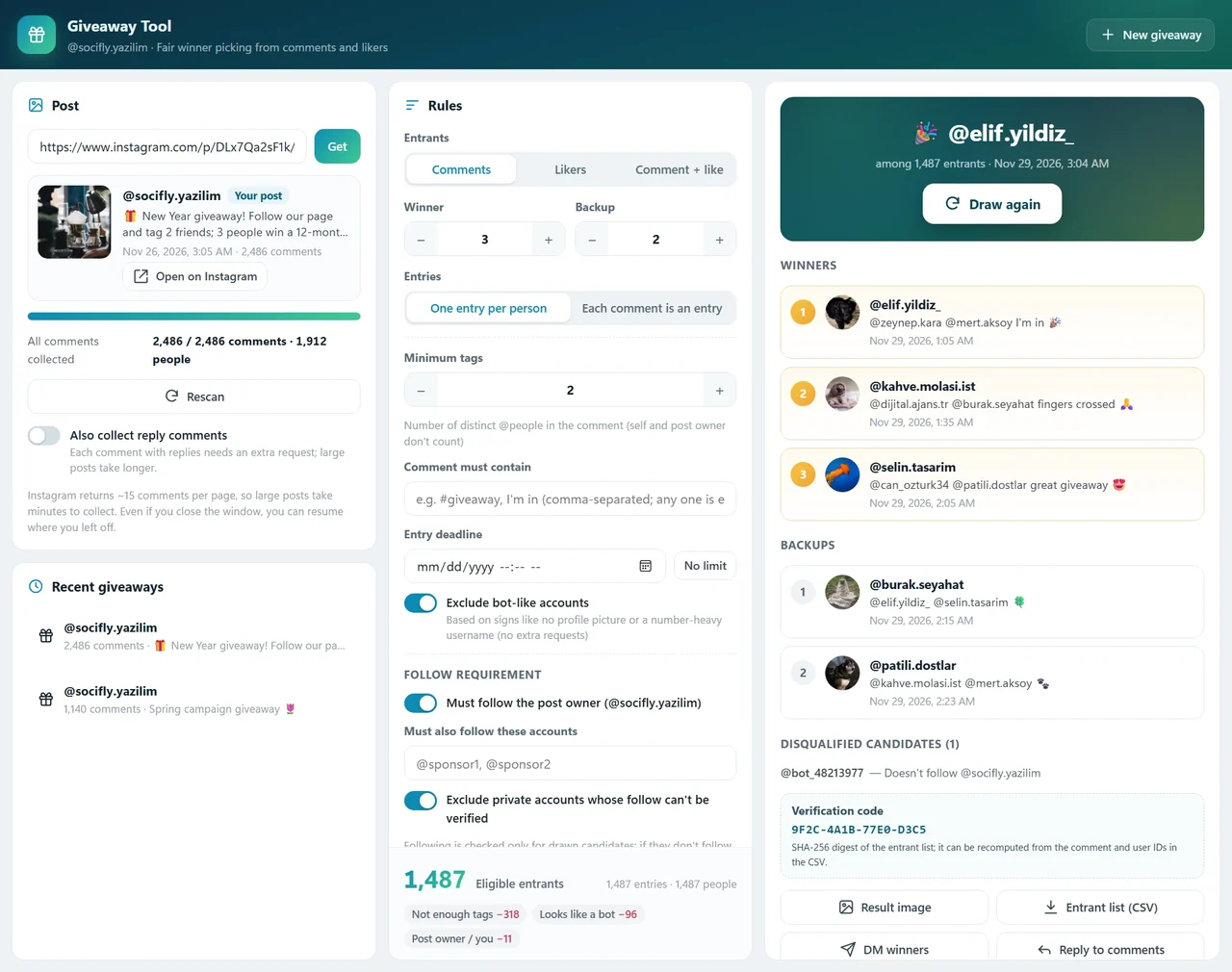
To start, paste the post link and press Get. The tool shows the post, its comment count and its caption. Then the collect comments button gathers the comments page by page.
Since Instagram returns about 15 comments per page, collecting can take minutes on large posts. Collected comments are saved on your computer. Even if you close the window, you can continue where you left off. Changing the rules doesn't send new requests; once the comments are collected, you can try as many different rule sets as you like. If new comments arrive during the giveaway, Rescan adds only the new ones.
If you want, Also collect reply comments adds the replies to comments to the list too. This sends an extra request for each comment with replies, so it takes longer on large posts.
Giveaway Rules: Tags, Words, Deadline and Bot Filtering
The rules are applied on your computer, so changing them doesn't send new requests to Instagram. Each post's rules are saved separately for that post.
- Entries: With One entry per person, each person's first valid comment counts. With Each comment is an entry, people who write more comments have a better chance.
- Minimum tags: You set how many different people must be tagged in the comment. The comment's author and the post owner don't count. In reply comments, the @tag Instagram adds at the start automatically doesn't count either.
- Comment must contain: You write words like "giveaway, I'm in" separated by commas; any one of them is enough. Upper and lower case don't matter.
- Entry deadline: Comments written after the deadline are disqualified.
- Exclude bot-like accounts: Signs such as no profile picture or a username full of numbers are checked. This check sends no extra requests.
- Excluded accounts: You list the accounts you don't want in the giveaway (teammates, competitors).
As you change the rules, the Eligible entrants count in the middle column updates, and you see how many comments were disqualified and why (not enough tags, missing word, looks like a bot and so on).
Giveaways from Likers
In the Entrants section you can choose Likers or Comment + like. The liker list is fetched in a single request.
How Is the Follow Requirement Checked?
The most common giveaway rule is "follow us". In the Follow requirement section you can add the post owner and, if you like, sponsor accounts too.
The follow check is done only for drawn candidates, not for every entrant. If a candidate doesn't meet the requirement, they are disqualified and a new one is drawn. Disqualified candidates appear in the list with the reason.
How Is the Winner Picked and How Is the Result Verified?
The winner is picked with your computer's cryptographic random number generator. Entries are arranged in a fixed order and the pick is made from this list.
The result screen shows:
- Winners and backups, together with their comments.
- Disqualified candidates and the reasons they were disqualified.
- Verification code: The SHA-256 digest of the entrant list. You can recompute this code from the comment and user IDs in the CSV file.
This way you can tell your followers "this was the list, this is the code it came from". The Entrant list (CSV) button exports this list.
Result Image, DM and Comment Reply
The Result image button saves the giveaway result as a PNG ready to share. The image includes the post card, the winners' profile pictures and the first line of their comments. Up to 10 winners and 6 backups fit on the image.
There are two ways to reach the winners:
- DM winners: A ready-made congratulations message comes up, and you can change it. You can use the %kullaniciAdi%, %adSoyad% and %sahip% variables and vary the message with {a|b} syntax. You can also send it to backups if you like.
- Reply to comments: Writes a public reply to the winner's giveaway comment.
Messages are sent only when you press the button and after you see the preview. The same type of message is never sent twice to the same person.
How to Use It
- In the InstaFly main panel, go to the Post & Story Tools menu and select Giveaway Tool.
- Paste the post link and press Get.
- Start collecting the comments and wait until it finishes. You can close the window and continue later.
- In the Entrants section, choose comments, likers or both together.
- Set the number of winners and backups, the entries and the other rules. Check the Eligible entrants count.
- If needed, add the post owner and sponsors to the Follow requirement section.
- Start the draw. If you don't like it, run a new draw with Draw again.
- Save the record with Result image and Entrant list (CSV), then send a DM or a comment reply to the winners.
Why InstaFly Giveaway Tool?
- You set the rules on one screen instead of reading comments by hand.
- The follow requirement is checked only for drawn candidates, so it's fast.
- With random picking and a verification code, you can prove the result to your followers.
- Even if collecting stops midway on large posts, it continues where it left off.
- Result image, CSV and DMs to winners in one place.
At InstaFly, our goal is to make effortful jobs like giveaways fast and reliable for you. Try your first giveaway and share the result with us. If there are rules or features you'd like to see in the tool, be sure to write them in the comments. The Giveaway Tool grows with your feedback. ❤️